Tuesday, September 25, 2012

How to change the ulimit in linux environment

This is the nice article i have found to avoid a too many file open issue
http://manisha-eleperuma.blogspot.com/2011/03/how-to-resolve-too-many-open-files.html

Thursday, September 20, 2012

How to run 32 bit bin files on top of the 64 bit ubuntu machine


This is the serious issue which i faced long time ago. I got a installation file which can install 32 bit operating systems. But i had to install it on top of my 64 bit ubuntu machine.every time it get failed.
           Then i installed 32 bit support libraries in to the 64 bit operating system with "apt -get installia32-libs" command.
After install above libraries i managed to run 32 bit bin file in my 64 bit ubuntu operating system.

Monday, June 18, 2012

How to restrict ssh to the linux users

If you want to restrict or allow particular user to do a ssh you need to take following steps. Based on your configuration it will allow or restrict to do a ssh to particular user/s.

1.  Open a sshd.config file
       " vi  /etc/ssh/sshd_config "
2.   if you want to allow to do a ssh for a particular user/users. you need to add below config to sshd_config file

      "AllowUsers user1 user2"
      Ex : "AllowUsers chamara menul sandya"

3.   if you want to deny to do a ssh for a particular user/users. you need to add below config to sshd_config file


     DenyUsers user1 user2"      
     Ex :   "DenyUsers chamara menul sandya"  
  
4.  Finally save the "sshd_config" file and restart the ssh service
     Ex : /sbin/service sshd restart  (only for a red hat servers)

Wednesday, May 2, 2012

How to connect Jprofiler with WSO2 Governance Registry

What is JProfiler?
       JProfiler is GUI enabled tool that used to measure performance based measurements such as CPU usage, memory bottlenecks and thread information etc, java based applications. more info

This article will demonstrate how JProfiler used to measure performance statistics in WSO2 Governance Registry. Same time this article applies to all carbon based products in WSO2.
     You can download any carbon based servers from wso2.org to execute this article. In here i am using WSO2 Governance Registry.

1. Download WSO2 Governance Registry
2. Download JProfiler from here.
3. Extract Jprofiler zip and if you are windows run jprofiler.exe or if you are in Linux environment run jprofiler.sh in /bin directory.

Now we need to create new jprofiler project to connect with the governance registry server. Below steps will guide you to create new JProfiler project.

4. Open JProfiler start center window by clicking on the start center button.
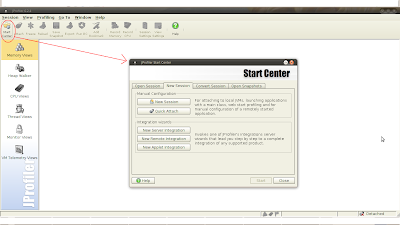

5. Click "New Remote Integration" button.

6 . Now profiled application need to locate. If you are locating application runs in same machine, you have to select "On this computer" option. If you are profiling remotely started application in other machine, you have to select "On a remote computer" option. In this article i will use first option.


7.  Now insert your JVM information.


8. Then select profile setting transmission option.


9. Click next button in  JProfiler port setting window.


10.  Copy option text listed in "perform required modification" window and that need to be copy in your CARBON_HOME/bin/wso2server.sh or .bat file like below.


11. Now start your governance registry and Jprofiler will connect with it.


Tuesday, January 31, 2012

Linux command of removing all .svn sub directories

Following steps will be help to remove all .svn directories

1. Open Linux terminal
2. Change the directory path to project folder.
3. Type below command.
  • find ./ -name ".svn" | xargs rm -rf